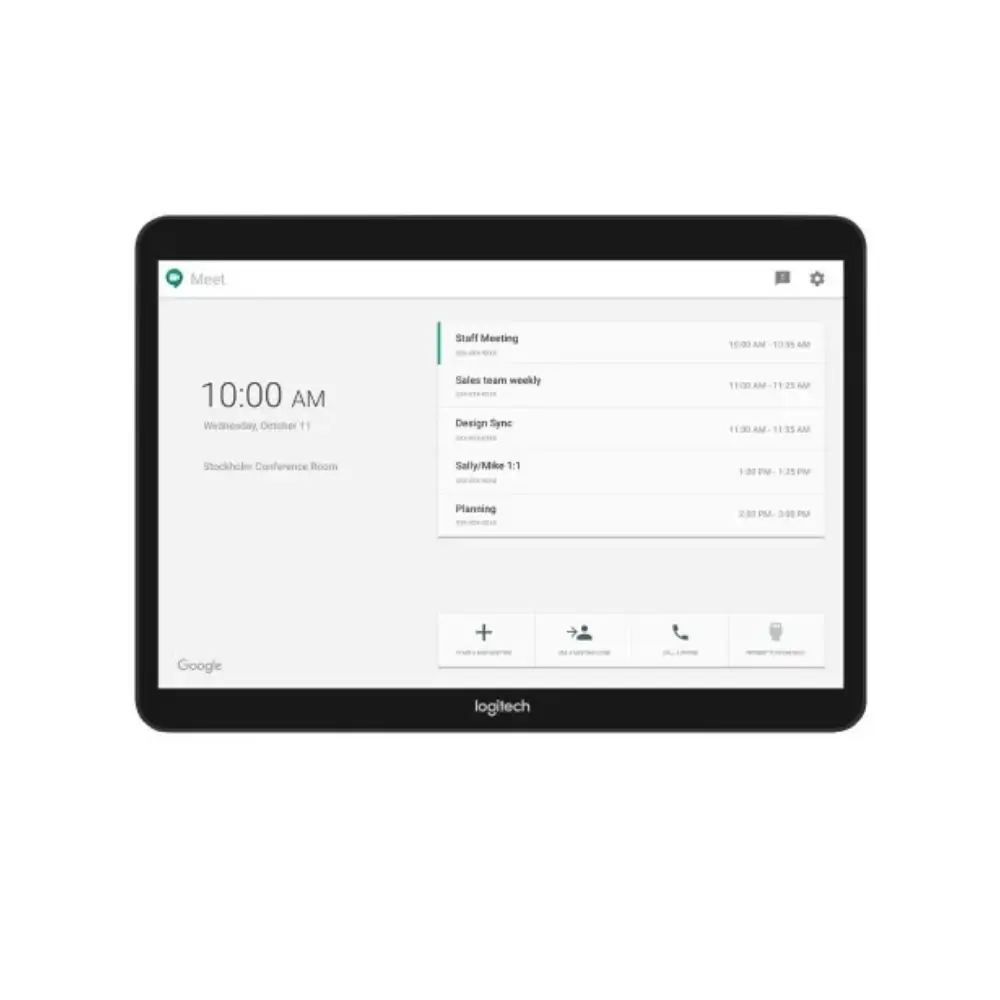
Logitech Tap 10.1-Inch Video Conference Touch Controller
৳125,000
Good to know
- 2 Years Warranty
- Cash on delivery available
- Ask on WhatsApp
Specifications
| Product Name | Logitech Tap |
|---|---|
| Manufacturer Part Number | 939-001796 |
| Device Type | Touch controller for video conferencing |
| Physical Size | 2.3 x 9.6 x 7.0 in (58 x 244 x 179 mm) |
| Unit Weight | 2.75 lb (1.25 kg) |
| Screen Size | 10.1-inch diagonal touchscreen |
| Screen Resolution | 1280 x 800 |
| Screen Tilt | 14° display angle |
| Screen Finish | Oleophobic, anti-glare coating |
| Connection to PC | USB Type-C (USB 2.0 / 3.0 / 3.1) |
| Accessory Connection | USB Type-A (USB 2.0 / 3.0 / 3.1) |
| Content Sharing Input | HDMI input for 1080p video and audio |
| Headset Port | 3.5 mm (1/8 in) 4-pole jack |
| Built-In Audio | Integrated ultrasonic speaker |
| Built-In Sensor | Integrated PIR motion sensor |
| Cable Management | Internal cable retention and strain relief system |
| Mounting Pattern | 100 x 100 mm VESA FDMI (Flat Display Mounting Interface) |
| Security Slots | 2 Kensington lock slots |
| Operating System Support | Windows 10; Chrome OS 75 and higher |
| PC Port Requirement | USB 2.0, 3.0 or 3.1 Type-A port |
| Display Technology | DisplayLink Plug and Display (extra display over USB on supported systems) |
Description
The Logitech Tap is a video conference touch controller that lets your team start and manage meetings from a single 10.1-inch touchscreen. Instead of juggling remotes, laptops and cables, participants control the room from one clear, easy-to-reach panel.
Designed for meeting rooms, boardrooms and huddle spaces, it works with Zoom Rooms, Microsoft Teams Rooms and Google Meet hardware. If you are building a setup around Logitech video conferencing, the Tap gives the room a simple, consistent point of control.
Key Features
- 10.1-inch touchscreen (1280 x 800): A large, sharp display keeps meeting controls easy to read and tap, so anyone can join or run a call without training.
- 14° display angle: The tilted screen is easier to see and use when the controller sits on a table.
- Oleophobic and anti-glare coating: Fingerprints wipe away more easily and reflections are reduced, so the screen stays readable in a busy meeting room.
- One-touch meeting control: Built for workplace conferencing, it keeps everyday meeting actions on one touch surface instead of scattered across devices.
- Versatile connections: USB Type-C to the PC, a USB Type-A port for accessories, an HDMI input for 1080p video and audio sharing, and a 3.5 mm 4-pole headset jack let you connect the tools your room already uses.
- Integrated ultrasonic speaker and PIR motion sensor: Built-in components reduce the need for extra add-ons on the table.
- Clean installation: An internal cable retention and strain relief system keeps cables tidy and protected, giving the room a neater look.
- VESA mounting and Kensington lock slots: A 100 x 100 mm VESA FDMI pattern allows flexible mounting, and two Kensington lock slots help keep the controller secure.
- DisplayLink Plug and Display support: On supported systems, including Windows 10 and Chrome OS, the Tap connects over USB and works as an additional display.
Why Choose the Logitech Tap Video Conference Controller
The Logitech Tap suits workplaces that want meetings to start quickly and run smoothly. Its touchscreen, compatibility with major meeting platforms and built-in speaker make it a practical, business-ready addition to any conference room.
Because it supports Zoom Rooms, Microsoft Teams Rooms, Skype Room System and Google Meet hardware, you are not tied to one platform. Combined with tidy cable management and secure mounting options, it is a dependable choice for offices that rely on Logitech video conferencing.
Best Use Cases
- Corporate meeting rooms and boardrooms
- Huddle spaces and small team rooms
- Hybrid offices running Zoom, Teams or Google Meet calls
- Training and presentation rooms that share content over HDMI
Compatibility
- Google Hangouts Meet hardware
- Microsoft Teams Rooms / Skype Room System
- Zoom Rooms
- Windows 10 and Chrome OS 75 and higher (USB Type-A port required)
- DisplayLink Plug and Display: connects over USB as an additional display on supported operating systems, including Windows 10 and Chrome OS
Warranty
2 Years Warranty
Read the warranty policyReviews
Frequently asked questions
Which meeting platforms does the Logitech Tap support?
It is compatible with Zoom Rooms, Microsoft Teams Rooms / Skype Room System and Google Hangouts Meet hardware.
How big is the Logitech Tap screen?
It has a 10.1-inch diagonal touchscreen with 1280 x 800 resolution, a 14° display angle and an oleophobic, anti-glare coating.
How does the Logitech Tap connect to a computer?
It connects to the PC through a USB Type-C interface, and it also has a USB Type-A port for accessory connections.
Can I share content through HDMI?
Yes. The HDMI input supports 1080p video and audio content sharing.
Logitech Store
More in-stock picks from this brand

Logitech Tap IP Meeting Room Touch Controller 10.1-Inch
৳125,000

Logitech MeetUp 2 4K Conference Camera with 4X HD Zoom
৳140,000

Logitech Group 960-001054 HD Video Conference System
৳105,000

Logitech 952-000044 Video Bar Wall Mount for Rally Bar
৳20,000

Logitech Spotlight 2 Wireless Presenter with Haptics
৳16,500

Logitech PRO X SUPERLIGHT 2 DEX Wireless Gaming Mouse
৳15,350

Logitech G535 Wireless Gaming Headset 33-Hour Battery
৳16,000

Logitech PRO X SUPERLIGHT 2C Wireless Gaming Mouse
৳15,950


