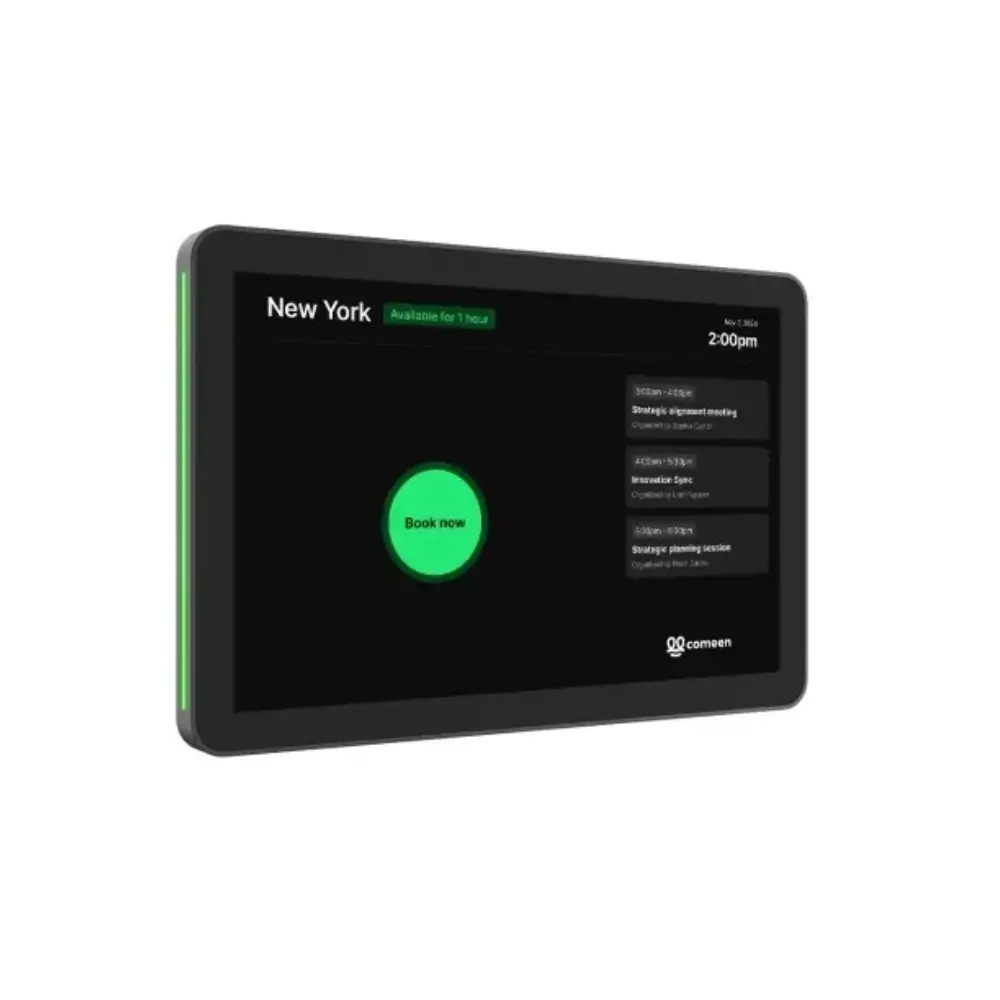
Logitech Tap Scheduler Meeting Room Scheduling Panel
৳155,000
Good to know
- 2 Years Warranty
- Cash on delivery available
- Ask on WhatsApp
Specifications
| Model | Logitech Tap Scheduler (MPN 952-000091, Graphite) |
|---|---|
| Screen | 10.1-inch diagonal capacitive touchscreen, 10-point multi-touch |
| Panel Type | IPS LCD with LED backlight |
| Resolution | 1280 x 800 |
| Brightness / Contrast | 400 nits / 1000:1 |
| Viewing Angle | 85° in every direction |
| Screen Coating | Oleophobic anti-fingerprint layer |
| Mounting Angle | 0° (flat against the surface) |
| Size (device only) | 165 x 246.2 x 28.5 mm (6.5 x 9.69 x 1.12 in) |
| Size (surface mounted) | 165 x 246.2 x 31.4 mm |
| Size (mullion mounted) | 165 x 292.6 x 44.5 mm |
| Weight | 0.7 kg (1.5 lbs) |
| Power | Power over Ethernet, IEEE 802.3af Type 1, Class 3 (PoE network or injector required) |
| Network | 10/100 Mbps Ethernet; Wi-Fi 802.11a/b/g/n/ac |
| Bluetooth | Version 5.0 (inactive, reserved for future use) |
| Management | Logitech Sync, Microsoft Teams Admin Center, Zoom Device Management |
| Security | AES-128 full-disk encryption, symmetric keys and PKI, device attestation, Arm TrustZone with RPMP key protection |
| Operating Conditions | 0 to 40°C, humidity 10 to 95% |
| Storage Temperature | -40 to 70°C |
| Sustainability | 54% post-consumer recycled graphite plastics, certified carbon neutral, FSC-certified paper packaging |
| Warranty | 2-year limited hardware warranty (1- or 3-year extensions where available) |
Description
Finding a free meeting room should not take a lap around the office. The Logitech Tap Scheduler is a 10.1-inch meeting room scheduling panel that mounts outside the room and shows its details and availability at a glance. Staff can book an impromptu or scheduled meeting right at the door.
A green or red light border shows whether the room is free, even from across the corridor. This makes it a practical choice for offices that want a tidy, professional Logitech meeting room setup that works with the booking tools they already use, such as Microsoft Teams, Zoom Rooms and Robin.
It is designed for flush wall installation, with built-in cable management that keeps the look clean. It suits corporate offices, co-working spaces, training centres and any workplace with shared rooms.
Key Features
- 10.1-inch touchscreen: The large, responsive display makes room details and booking options easy to read, so people can reserve a space in a few taps.
- Green/red availability light: A coloured border shows from a distance whether a room is free or taken, so nobody walks in on a meeting by mistake.
- Anti-fingerprint coating: The oleophobic surface resists smudges, so the screen stays readable even with constant touching.
- Flat, low-profile mounting: The panel sits flush against the wall with no offset, giving a discreet look and easy reading from different heights.
- Durable, sealed build: The screen is sealed to protect the internal parts and withstand regular cleaning, which suits busy shared spaces.
- Multiple mounting options: Glass, drywall, corner and mullion mounting let you install it outside almost any room.
- Built-in cable management: Cables stay hidden, so the installation looks clean and professional.
- Remote device management: IT teams can monitor and manage it through Logitech Sync, Microsoft Teams Admin Center or Zoom Device Management, saving time on upkeep.
Why Choose Logitech Tap Scheduler Meeting Room Scheduling Panel
If your team wastes time hunting for free rooms or dealing with double bookings, a dedicated panel outside each room solves the problem. The Logitech Tap Scheduler shows availability on the spot, so people stop guessing or messaging each other to ask whether a room is free.
It also fits into your existing setup. It is certified for or compatible with leading scheduling solutions, so you can keep your current booking platform. For Logitech meeting room deployments, it pairs naturally with Logitech Sync for central management.
Security and sustainability are covered too. It has full-disk encryption and device attestation, and its graphite plastics contain 54% post-consumer recycled material. A 2-year limited hardware warranty is included.
Best Use Cases
- Corporate meeting rooms and boardrooms
- Huddle rooms and small collaboration spaces
- Co-working spaces with shared rooms
- Training rooms and conference centres
Compatibility
The Logitech Tap Scheduler is certified for or compatible with these room scheduling solutions:
- Microsoft Teams Panel
- Zoom Rooms Scheduling Display
- Robin room display
- Appspace meeting room display
- Ricoh Spaces
- Envoy Rooms
- Korbyt
- Comeen
- Logitech Room Booking
Package Includes
- Logitech Tap Scheduler
- Multi-surface mount (glass/drywall)
- Corner mount accessory
- Mullion mount
- Mounting hardware
- Documentation
A PoE injector and Ethernet cable are not included.
Warranty
2 Years Warranty
Read the warranty policyReviews
Frequently asked questions
What is the Logitech Tap Scheduler?
It is a 10.1-inch touchscreen scheduling panel that mounts outside a meeting room. It shows room details and availability and lets people book the room for ad hoc or future meetings.
How does the Tap Scheduler show whether a room is free?
A border light turns green when the room is available and red when it is occupied. It is visible from a distance without being distracting.
Which platforms does it work with?
It is certified for or compatible with Microsoft Teams Panel, Zoom Rooms, Robin, Appspace, Ricoh Spaces, Envoy Rooms, Korbyt, Comeen and Logitech Room Booking. Check Logitech’s compatibility page for the latest list.
How is the Tap Scheduler powered?
It uses Power over Ethernet (IEEE 802.3af). You need a PoE-enabled network or a PoE injector, plus an Ethernet cable. Neither is included in the box.
Logitech Store
More in-stock picks from this brand

Logitech Tap IP Meeting Room Touch Controller 10.1-Inch
৳125,000

Logitech Tap 10.1-Inch Video Conference Touch Controller
৳125,000

Logitech SmartDock Skype Room System Meeting Console
৳84,990

Logitech Rally Bar 4K Video Conferencing Camera System
৳480,000

Logitech Z906 5.1 Speaker System with THX Certification
৳33,480

Logitech Rally Plus 4K Video Conferencing System Set
৳375,000

Logitech Group Expansion Microphones Pair for Meetings
৳34,890

Logitech Rally System Video Conferencing Camera Set
৳320,000


