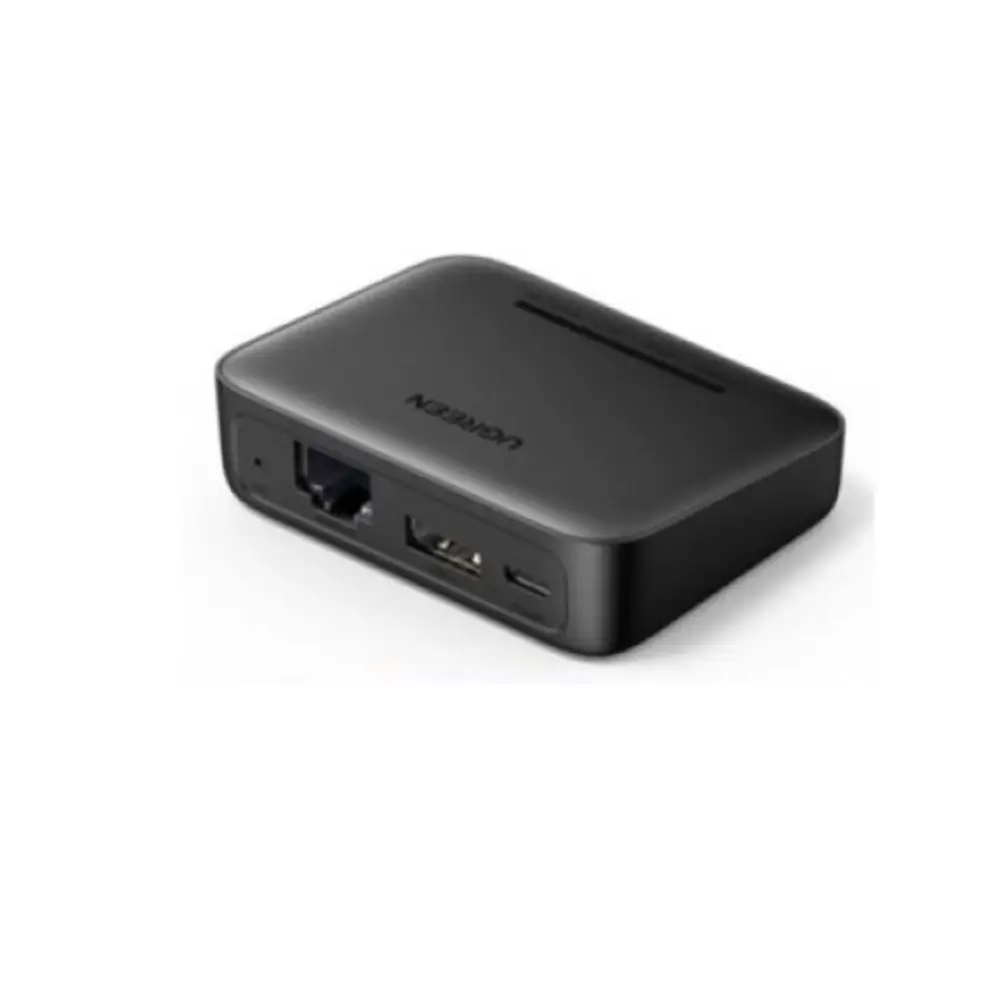
UGREEN CM428 USB Network Print Server with RJ45 LAN
BDT 6,650
Quantity
The UGREEN CM428 USB network print server lets you connect one compatible USB printer to your wired network and share it with multiple computers on the same LAN. Instead of keeping a printer attached to one PC, you plug it into the CM428 and the whole office or home network can print to it.
If you are looking for a reliable UGREEN print server for a small office, shop or home workspace, the CM428 keeps things simple. It has one RJ45 Ethernet port, one USB 2.0 port for the printer, and a compact body that fits beside almost any printer.
Setup uses the Windows Print Server Config Tool, where you assign a fixed local IP address so your computers can find the print server on the network.
Key Features
- RJ45 wired LAN connection: Connects through a standard Ethernet port, so the printer stays reachable over your wired network without depending on Wi-Fi.
- USB 2.0 printer port (up to 480Mbps): Gives a dedicated connection to your USB printer, so print jobs move from the network to the printer smoothly.
- RAW protocol support: Works with USB printers that support the RAW printing protocol, so you can check compatibility before you order.
- Multi-user network printing: Multiple LAN computers can share one printer, which saves you from buying a printer for every desk.
- Fixed local IP configuration: The print server keeps a stable address, so computers can reliably find the printer on your network.
- Micro-USB power input (5V/1A): Needs only a small 5V/1A power source, so it is easy to place near the printer.
- Compact design (69 x 55 x 20mm): Small enough to sit next to the printer without taking up desk space.
Why Choose the UGREEN CM428 USB Network Print Server
A shared printer saves money and desk space. With the UGREEN CM428, one compatible USB printer can serve several computers on your LAN, so you can keep a single printer in a central spot instead of moving cables or files between PCs.
It is a focused, wired solution. There is no Wi-Fi to configure and no extra features to learn: plug in the printer, connect the LAN cable, set the fixed local IP, and share. For anyone who wants a dependable UGREEN print server for everyday office printing, that simplicity is the main advantage.
One thing to keep in mind: each client computer needs a compatible driver for the connected printer. Check that your printer supports the RAW protocol before ordering.
Best Use Cases
- Small offices sharing one printer across several desks
- Shops and counters that print invoices and receipts from different computers
- Home offices with more than one PC on the same wired network
- Classrooms and training rooms with a single shared printer
Technical Specifications
| Specification | Details |
|---|---|
| Model | UGREEN CM428 (10941) |
| Product Type | USB Network Print Server |
| Network Interface | 1 x RJ45 Ethernet |
| Printer Interface | 1 x USB-A 2.0 |
| Power Input | Micro-USB, 5V/1A |
| USB Standard | USB 2.0 |
| USB Data Rate | Up to 480Mbps |
| Printing Protocol | RAW |
| Network Connection | Wired LAN |
| Printer Capacity | 1 Compatible USB Printer |
| Printer Sharing | Multiple LAN Computers |
| Initial Configuration | Windows Print Server Config Tool |
| IP Configuration | Fixed Local IP |
| Compatible Printers | RAW Protocol USB Printers |
| Wi-Fi | No |
| Scanning Support | No |
| Dimensions | 69 x 55 x 20mm |
| Color | Black |
Compatibility
Supported printers: USB printers that support the RAW protocol. One printer can be connected at a time.
Supported computers: Multiple computers on the same wired LAN. The initial configuration is done with the Windows Print Server Config Tool.
Important: Each client computer needs a compatible driver for the connected printer. Successful printing depends on the printer model, network addressing and operating-system support. It is not a universal driver-free plug-and-play setup.
Not supported: Wi-Fi connection and scanning.
Frequently asked questions
What is the UGREEN CM428 USB network print server?
It is a small device that connects one USB printer to your wired network, so multiple computers on the LAN can print to it.
How many printers can I connect to the UGREEN CM428?
One compatible USB printer, through its USB 2.0 port.
Does the UGREEN CM428 support Wi-Fi?
No. It connects through a wired RJ45 Ethernet port only.
Do I still need to install printer drivers on each computer?
Yes. Each client computer needs a compatible driver for the connected printer. The CM428 is not a universal driver-free solution.
UGREEN Store
More in-stock picks from this brand

UGREEN XG501 4K HDMI Video Capture Card with USB-C 3.0
৳16,480

UGREEN X766 200W 8-Port GaN USB C Charger Fast Charging
৳8,999

UGREEN MU006 Bluetooth Wireless Mouse with Silent Click
৳1,750

UGREEN 20827 USB 3.0 Extension Cable 10M with 5Gbps Speed
৳3,340

UGREEN 60137 USB to Micro USB Data Cable 1.5M Black
৳640

UGREEN 50307 USB C to Ethernet Adapter 1000Mbps Gigabit
৳1,740

UGREEN CM140 Portable USB C to VGA Converter 1080p
৳1,740

UGREEN L532 USB-C to USB-C Cable 240W PD Fast Charging
৳1,140


